
Used iPhone Buying Guide: Dhangadhi Counter Checklist
A used iPhone can make sense in Dhangadhi, but the exact unit matters more than a grade label. Two phones with the same model and storage can have different repair histories, battery condition and seller terms. Use this guide at the counter before making a payment, whether you buy locally or arrange delivery to another part of Sudurpashchim.
Updated October 29, 2026 from Apple's buyer guidance and Nepal Telecommunications Authority's MDMS portal. This is an editorial checklist, not a test report for a particular phone. It does not establish NikoDeal stock, a fixed battery-health threshold, a certification protocol or a warranty for every used unit.
Start with the phone you are actually buying
Write down the model, storage, condition, IMEI and final quote. Ask which accessories are included and whether any repair is known. Match the physical unit to the seller's listing and paperwork. A price for a different storage size, repaired display or battery condition is not a direct comparison.
Browse the used-phone catalog for listings, then confirm the exact unit and terms with the seller. A category name such as Grade A does not by itself tell you which tests were performed. Ask for the inspection record rather than assuming a 20-point or 45-point process, original parts or a minimum percentage from the label alone.
Activation Lock is a separate gate
Apple advises against buying an iPhone with Activation Lock enabled. If it says "iPhone Locked to Owner", the seller needs to remove the link to the previous owner's account. Do not pay on the promise that someone will unlock it later.
Let the seller handle their account password and erase their data. Do not ask them to share their password with you. A Home screen on an already configured phone is not the same as proof that the phone can be activated for its next owner. Apple says an erased phone showing Hello needs setup, including activation, before you can test its features. If setup asks for the previous owner's account, return the phone to the seller to resolve it before you take ownership.
Read the repair history, not just the display brightness
On supported models with iOS 15.2 or later, Apple directs buyers to Settings > General > About for Parts and Service History. The information available depends on the model and repair history. If a part has been serviced more than once, Apple says only the most recent service appears.
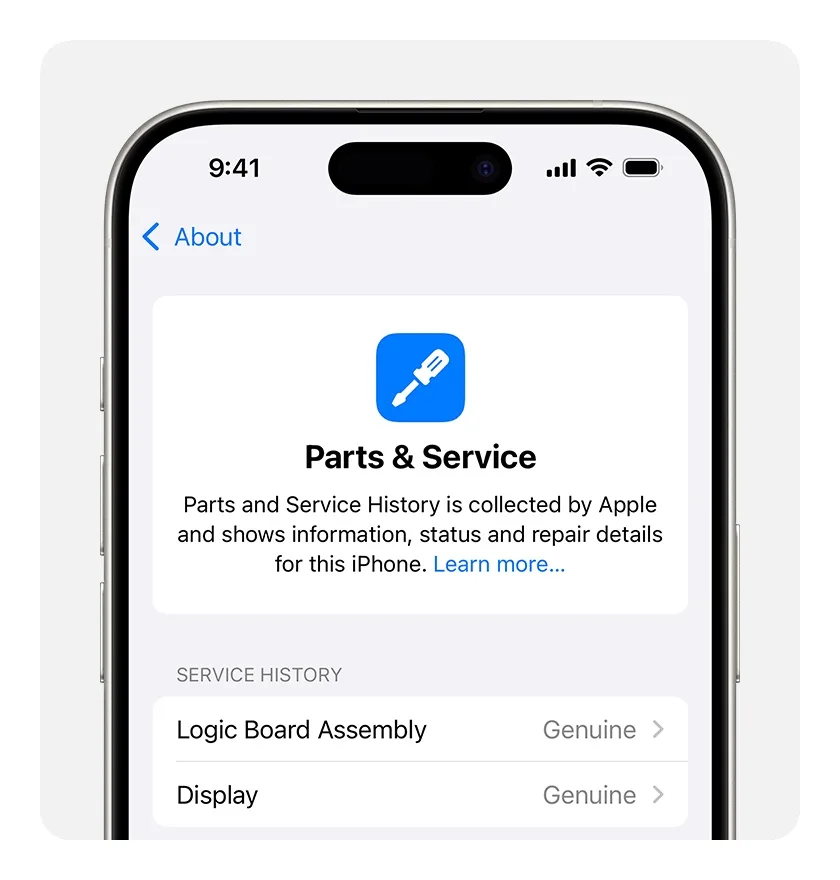
Image: Apple Support. Example interface only, not a NikoDeal stock unit or an inspection result. Source: Apple Parts and Service History linked below.
Apple's labels need context. "Genuine" means a repair used genuine Apple parts and processes. "Used" means the part was previously installed in another iPhone. "Unknown" can mean a nongenuine part, a part not working as expected, or a part not verified and linked after repair. It is not a single diagnosis of deliberate fraud. "Finish Repair" means the repair setup still needs completion; ask the seller to resolve it and demonstrate affected features before buying.
An inspection screen cannot guarantee that a phone has never been opened or exposed to liquid. Do not substitute True Tone, a cosmetic grade or a single software reading for a clear repair history and functional checks.
Battery percentage is one part of the decision
Open the available Battery Health settings and read the capacity and any service or important battery messages. Apple's buyer guide notes limits on battery-health information for unknown or nongenuine batteries. A displayed percentage alone does not prove originality or predict how long your own apps will run.
Ask what battery condition the seller is offering for this unit and whether replacement is included in the quote or would cost extra. There is no universal 85% promise established by this guide. If the phone cannot turn on or charge, Apple's advice is not to buy it when the battery will not charge. Do not open the phone yourself to investigate a suspect battery at the counter.
Test the functions you need in Kailali
With the seller's permission and the phone set up, check the screen, buttons, Wi-Fi, microphone and speakers. Record and replay a Voice Memo. Take photos in different light and try the cameras that this exact model actually has. Not every iPhone has telephoto, LiDAR or a 120Hz display.
In Settings > General > About, Apple says "No SIM restrictions" beside Carrier Lock means the phone is unlocked. A named carrier indicates a restriction. Demonstrate calls and mobile data with the SIM or eSIM arrangement you intend to use rather than assuming a network label guarantees local compatibility. Do not erase anyone's eSIM or personal data just to run a test.
Check registration and get terms in writing
NTA's MDMS portal asks buyers to verify registration before purchase. Obtain the IMEI from the device and use the official portal; the keypad code to display an IMEI is *#06#, not a registration certificate. For a phone with more than one IMEI, check the identifiers relevant to the unit. Registration, Activation Lock and physical condition are different questions.
Ask for the seller's invoice, unit identity and written support terms. Confirm the warranty duration, covered faults, exclusions, claim location, return window and who pays transport from your town. Do not assume a six-month parts-and-labor warranty, liquid-damage coverage, an insured courier or a fixed delivery deadline from a grade label or an old article. A bill and an MDMS result do not guarantee that every future fault is covered or establish complete legal protection by themselves.
If comparing a used iPhone with a new phone, use the under-Rs30,000 buying guide for a budget checklist, not an assumed quote for either option. Check delivery and pickup terms before arranging transport. Walk away from unresolved account locks or material differences between the actual unit and what was promised.
Sources
Checked October 29, 2026. Menus and supported checks can differ by model and iOS version.
Frequently Asked Questions
Frequently asked questions and verified answers for Nepal.